From Data to Geometry: Our Parametric Design Workflow
2026-03-18 · 10 min read · David Serrano
Why Workflow Matters
In parametric architecture, the tool chain matters as much as design talent. A parametric facade is not drawn — it is computed. And the quality of that computation depends on how data flows between analysis, design, documentation, and visualization tools. A broken workflow produces geometry that looks parametric but performs conventionally. A connected workflow produces geometry where every angle, every opening, and every material choice is backed by measurable data.
This article walks through the actual pipeline we use at Arquitectura Introspectiva — the same workflow behind Torre ZMX, Pabellón Introspectivo, Ruled Residence VB, and Hotel Diagrid Puerto Escondido. No generic theory. Just the tools, the sequence, and the rationale for each step.
Step 1: Environmental Analysis with Ladybug
Every project starts with environmental analysis, not form-making. Before we sketch a single line, we build a complete picture of the site's solar, wind, and thermal conditions using Ladybug and Honeybee — open-source environmental analysis plugins that run directly inside Grasshopper.
What We Analyze
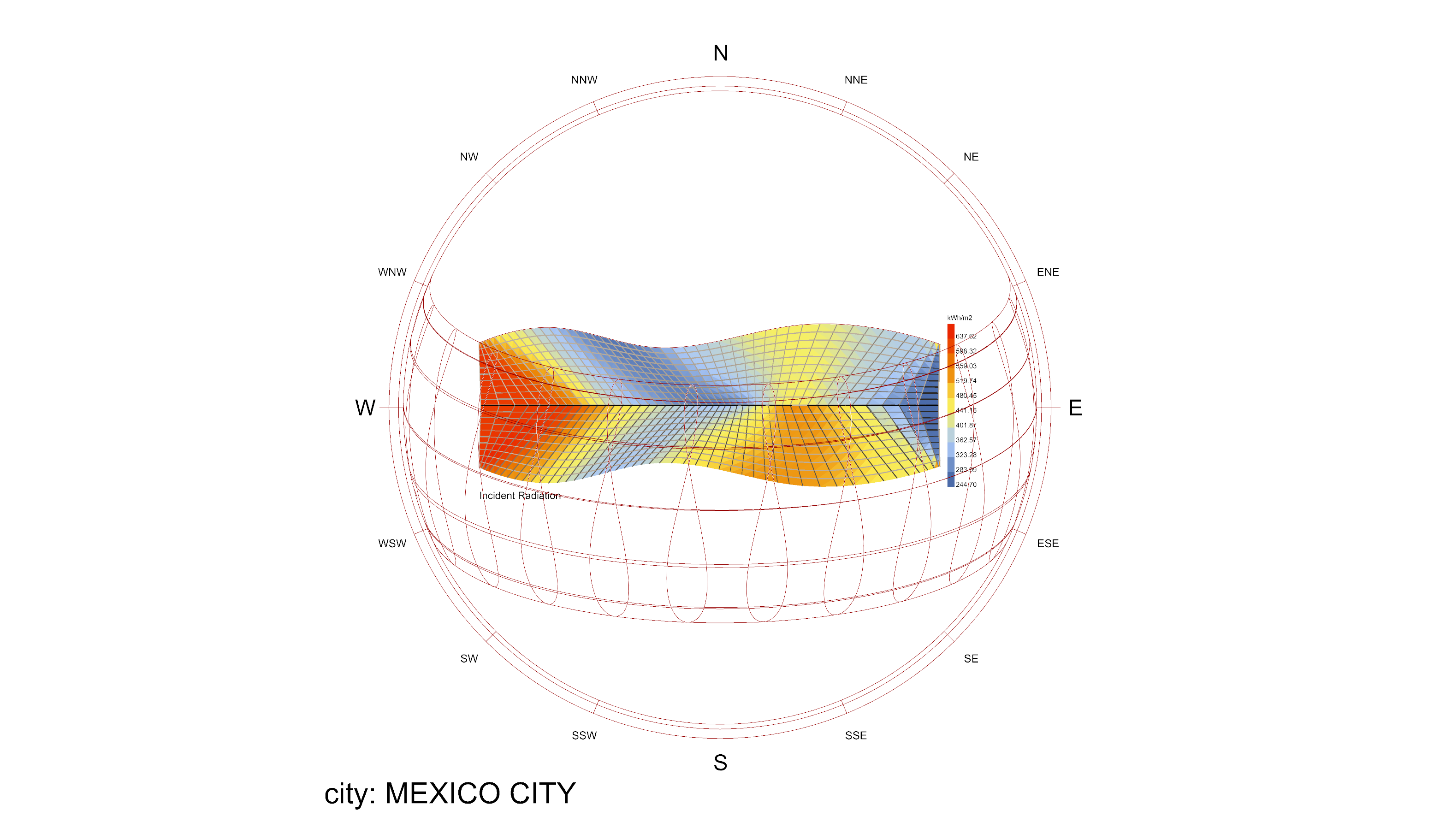
- Solar radiation: Annual and monthly cumulative radiation (kWh/m²) mapped across the site and building envelope. This tells us exactly where thermal gain is highest and where shading is critical.
- Sun path diagrams: The sun's position throughout the year, overlaid on the building mass. These diagrams reveal which facade orientations receive direct sun at which hours and seasons — data that directly drives panel angles.
- Wind analysis: Prevailing wind directions and velocities, informing natural ventilation strategies and facade porosity.
- Thermal comfort: UTCI (Universal Thermal Climate Index) analysis for outdoor spaces, ensuring that terraces, courtyards, and public areas are comfortable year-round.
Why This Comes First
In conventional practice, environmental analysis happens after design — as a check, not a driver. In our workflow, the analysis data is the input to the parametric definition. When Ladybug shows that the west facade of a Mexico City site receives 847 kWh/m² in peak months, that number flows directly into Grasshopper and determines the ruled surface panel angles on that orientation. The design does not respond to the analysis retroactively — it is generated by it.
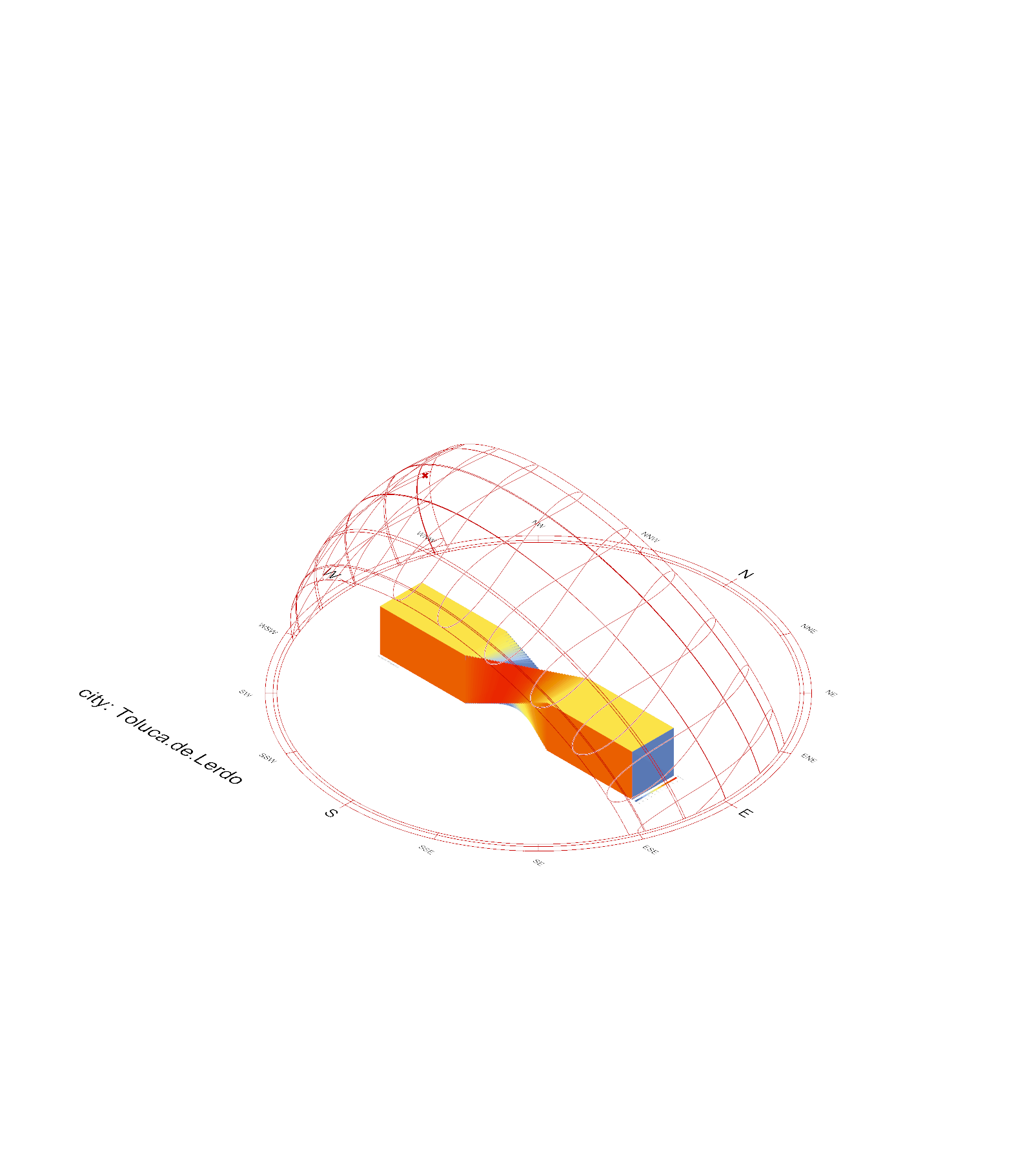
We use EPW (EnergyPlus Weather) files from local weather stations — not generic regional data, but site-specific hourly records for temperature, radiation, wind speed, and humidity. For Valle de Bravo (1,800m altitude) and Toluca de Lerdo (2,600m altitude), the climate profiles are dramatically different from Mexico City despite being in the same region. Using the wrong weather file produces the wrong geometry.
Step 2: Parametric Form Generation in Grasshopper
With environmental data in hand, we build the parametric definition in Grasshopper — the visual programming environment that runs inside Rhino. This is where analysis data transforms into building geometry.
How It Works
A Grasshopper definition is a network of connected components, each performing a specific operation: generate a curve, divide it into points, create lines between points, evaluate solar radiation at each point, map radiation values to panel angles. The definition encodes the logic of the design — change any input parameter, and the entire geometry regenerates.
Ruled Surface Generation
Our signature technique is the ruled surface: a surface generated by sweeping straight lines between two boundary curves. The result looks dramatically curved, but every element is straight — which means every panel is planar and every structural member is fabricable from standard sections. Torre ZMX's entire envelope is a ruled surface. Pabellón Introspectivo's timber canopy is a ruled surface. The visual complexity comes from algorithmic variation in line spacing and angle, not from double-curved geometry that requires custom molds.
Attractor Points and Data-Driven Variation
We use attractor-point logic to create variation across a surface. Points of high solar radiation (from the Ladybug analysis) become attractors that increase panel density or steepen shading angles. Points near view corridors become attractors that increase aperture size. The result is a facade that varies continuously — no two panels are identical — but every variation has a quantifiable reason.
Optimization
For complex multi-objective problems (minimize solar gain AND maximize daylight AND minimize structural material), we use evolutionary solvers like Galapagos and Wallacei inside Grasshopper. These algorithms evaluate thousands of design variations and identify the Pareto-optimal solutions — the best possible trade-offs between competing objectives. The architect then selects from this optimized set based on project priorities and aesthetic judgment.
Step 3: BIM Integration with ARCHICAD
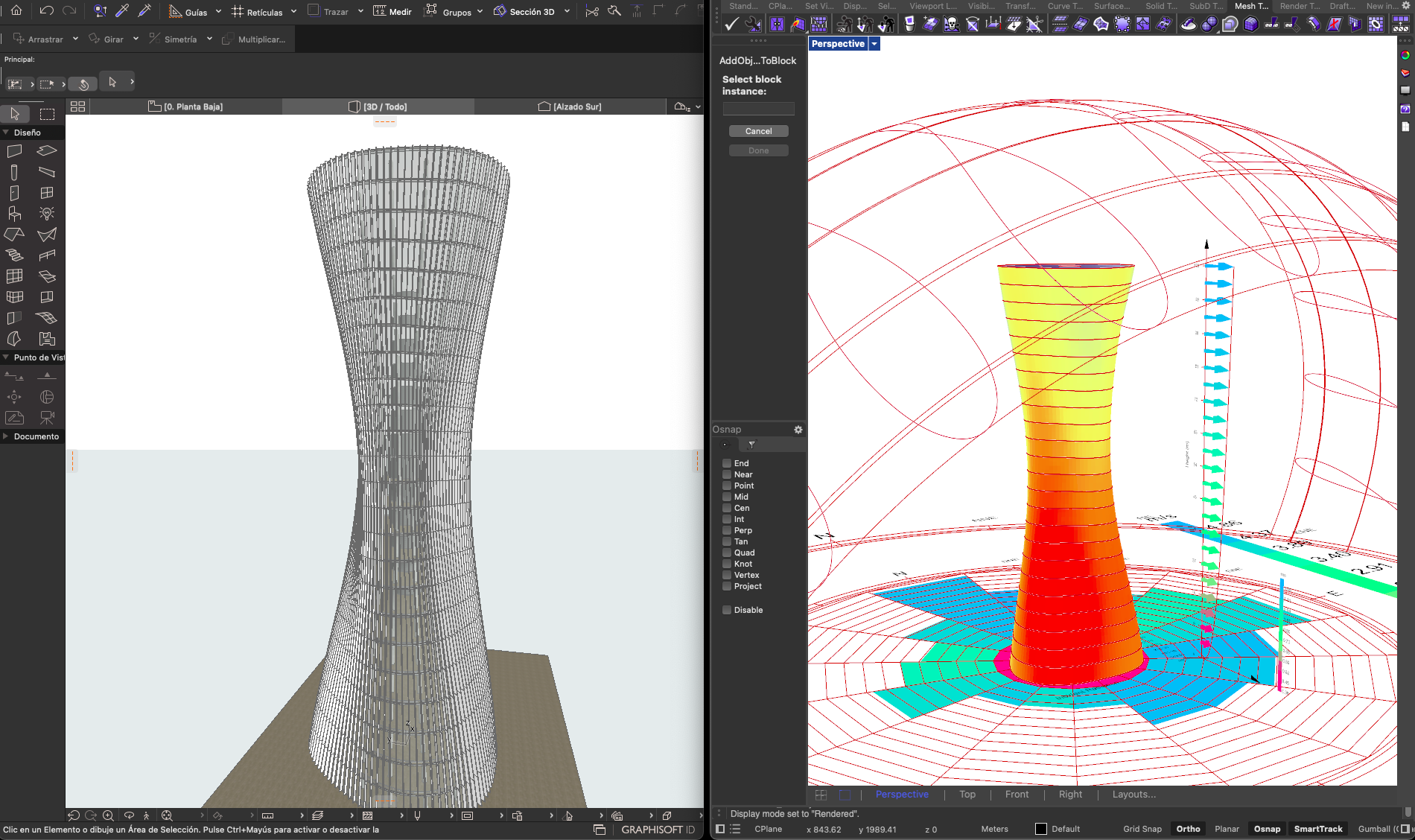
Parametric geometry is only valuable if it can be documented, coordinated, and built. This is where ARCHICAD enters the workflow — and where our specific background gives us an edge.
David Serrano's GRAPHISOFT Background
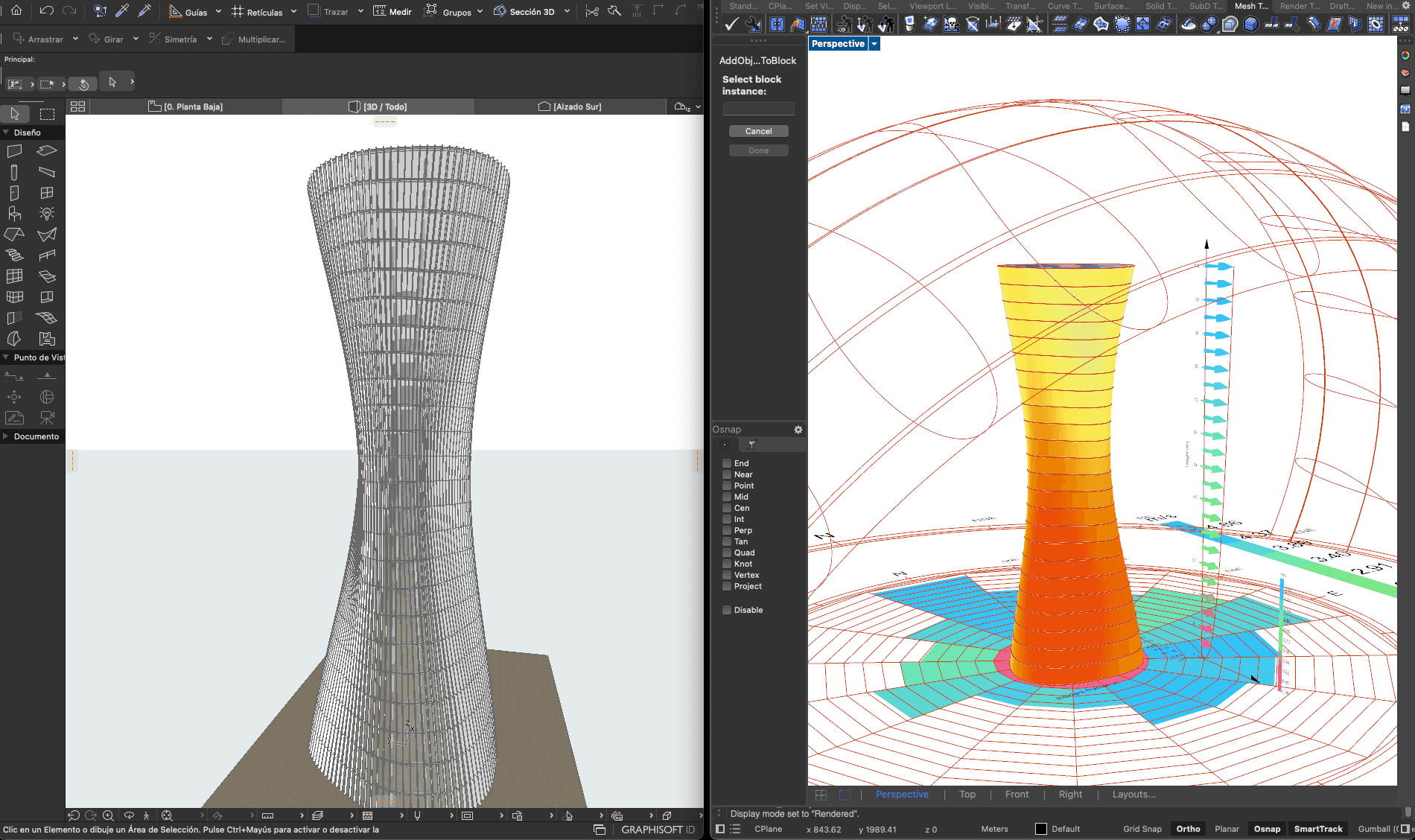
Before founding Arquitectura Introspectiva, David Serrano spent 8 years at GRAPHISOFT — the company that develops ARCHICAD. This is not incidental. That experience means we understand the BIM platform at a level that goes beyond typical user proficiency. We know the data structures, the API capabilities, the Live Connection's geometry handling, and the documentation pipeline from the inside.
The Rhino-ARCHICAD Live Connection
The Live Connection is the bridge that makes our parametric-to-BIM workflow viable. Geometry created in Grasshopper streams directly into ARCHICAD as native BIM elements — walls, slabs, columns, curtain wall panels — with full property data, classification codes, and scheduling information. The connection is bidirectional: changes in ARCHICAD can flow back to Rhino, and changes in Grasshopper update the BIM model in real time.
This eliminates the manual translation step that plagues most parametric workflows. In a typical practice, parametric geometry is exported as a mesh or NURBS surface, then manually re-modeled in the BIM platform. That process is slow, error-prone, and loses the parametric intelligence. With the Live Connection, the BIM model is the parametric model — they are the same data.
What ARCHICAD Produces
- Construction documents: Plans, sections, elevations, details — all generated from the parametric BIM model
- Schedules and quantities: Panel counts, material quantities, cost estimates — automatically extracted from the geometry
- IFC exports: Open BIM coordination with structural engineers, MEP consultants, and contractors
- Clash detection: Identifying conflicts between parametric geometry and building systems before construction
Step 4: Visualization and Communication
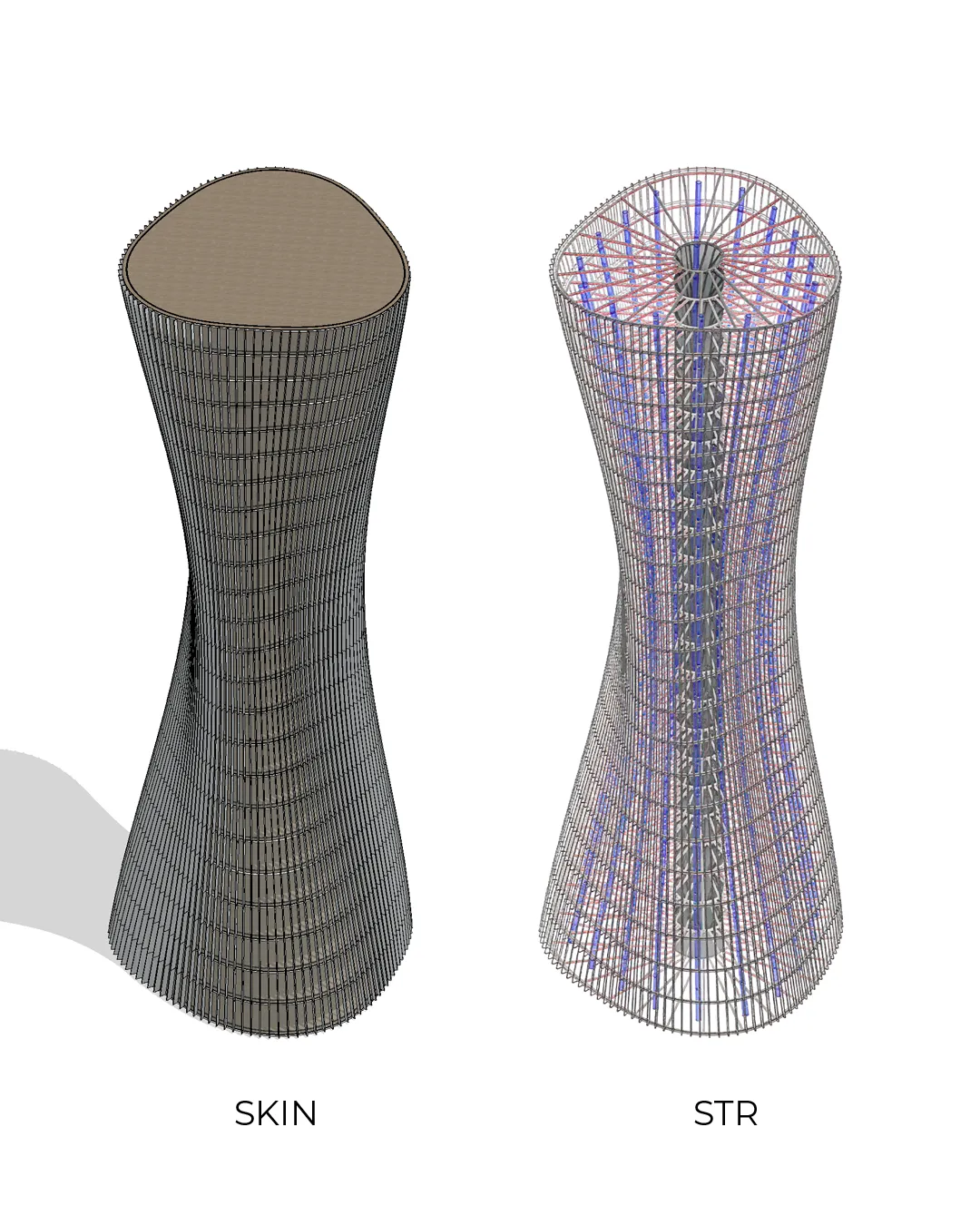
Parametric architecture faces a communication challenge: the people who approve and finance buildings — developers, investors, planning committees — think visually, not algorithmically. They need to see the building, feel the space, and understand the logic without reading a Grasshopper definition. Visualization is how we bridge that gap.
Twinmotion for Real-Time Rendering
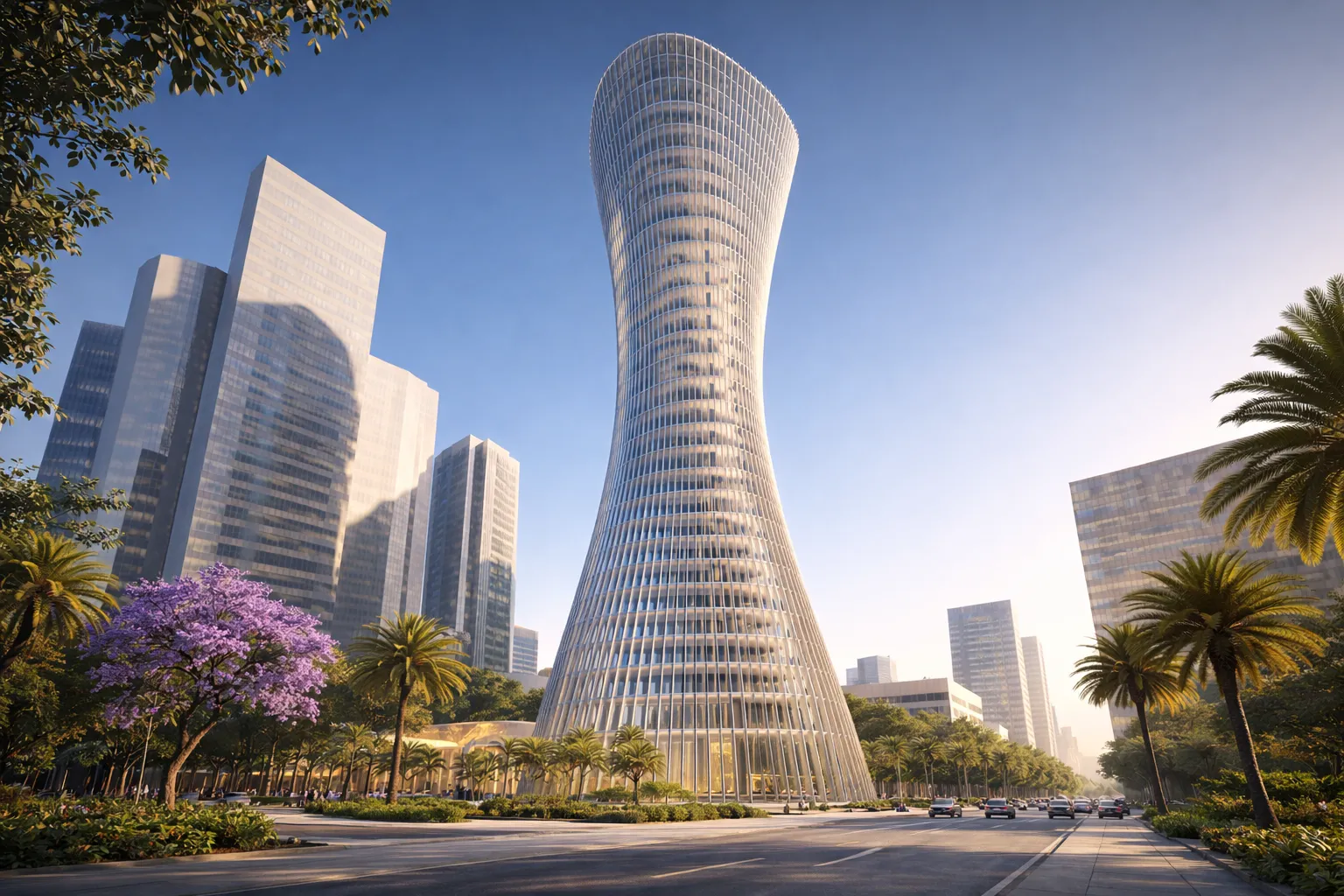
We use Twinmotion connected directly to the ARCHICAD model. The same BIM model that generates construction documents also generates the photorealistic renders you see on this site — Torre ZMX at golden hour, the Pabellón in its forest clearing, the Diagrid Hotel against the Pacific. Because the rendering model and the documentation model are the same, there is no risk of the renders showing something different from what will be built.
Diagramming Parametric Logic
For developer presentations, we produce diagrams that explain the parametric logic in visual terms. The Torre ZMX skin-vs-structure diagram (shown above) communicates a complex idea — that the ruled surface envelope is an independent system from the structural core — in a single image. These diagrams are as important as the renders. They give the developer confidence that the design is not arbitrary complexity but an engineered system with clear performance rationale.
Why This Matters for Approval
Developers who understand the logic behind parametric design become advocates for it. When they can explain to their investors that "every panel angle reduces thermal gain by X%" and show the diagram that proves it, the design stops being a risk and becomes a value proposition. Our visualization and diagramming practice is designed to produce that moment of understanding.
AI-Augmented Concept Development
We integrate artificial intelligence into the earliest and most strategic phase of the design process — concept development. AI augments the architect's judgment, it does not replace it.
Where AI Adds Value
- Brief analysis: Given a project brief (site, program, budget, market positioning), AI generates a structured analysis of design opportunities, constraints, and strategic directions. This accelerates the critical phase between receiving a brief and starting parametric modeling.
- Concept narratives: AI generates written design concepts that articulate the relationship between site conditions, program, and architectural strategy. These narratives define what the parametric definition should optimize for.
- Rapid option exploration: For early-stage client presentations, AI helps generate and evaluate multiple conceptual directions before committing to parametric development — widening the creative field without consuming modeling time.
The AI Design Engine
The AI Design Engine on our website is a public demonstration of this capability. Visitors describe a project and receive a preliminary design concept with spatial strategy, material palette, and sustainability approach. It is not a finished design — it is a starting point that shows how AI can compress the strategic phase of architecture from weeks to minutes.
Where Human Expertise Remains Essential
AI does not generate Grasshopper definitions, run Ladybug analyses, or produce BIM documentation. Those require the specific technical expertise and professional judgment that define our practice. The computational and technical layers remain entirely architect-driven.
Results: What This Workflow Produces
The value of our workflow is not in any single tool — it is in the connected pipeline that ensures environmental data drives geometry, geometry flows into documentation, and documentation produces buildable construction information. Here is what that pipeline delivers.
Faster Iteration
Because the parametric definition in Grasshopper is connected to both Ladybug (analysis) and ARCHICAD (documentation), changing a design parameter updates performance data and construction documents simultaneously. A facade iteration that would take a conventional practice days to evaluate, re-model, and re-document takes us hours. Over the course of a project, this compresses the design timeline by 20-30% while evaluating 100x more design variations.
Quantified Performance
Every design decision has a number behind it. Torre ZMX's west-facade thermal gain reduction: 40%. Pabellón's timber canopy shading performance: calibrated to Ladybug radiation thresholds. Ruled Residence VB's panel angles: parameterized by monthly kWh/m² data for Toluca de Lerdo. This is not post-rationalization — the numbers came first, and the geometry followed.
Buildable Complexity
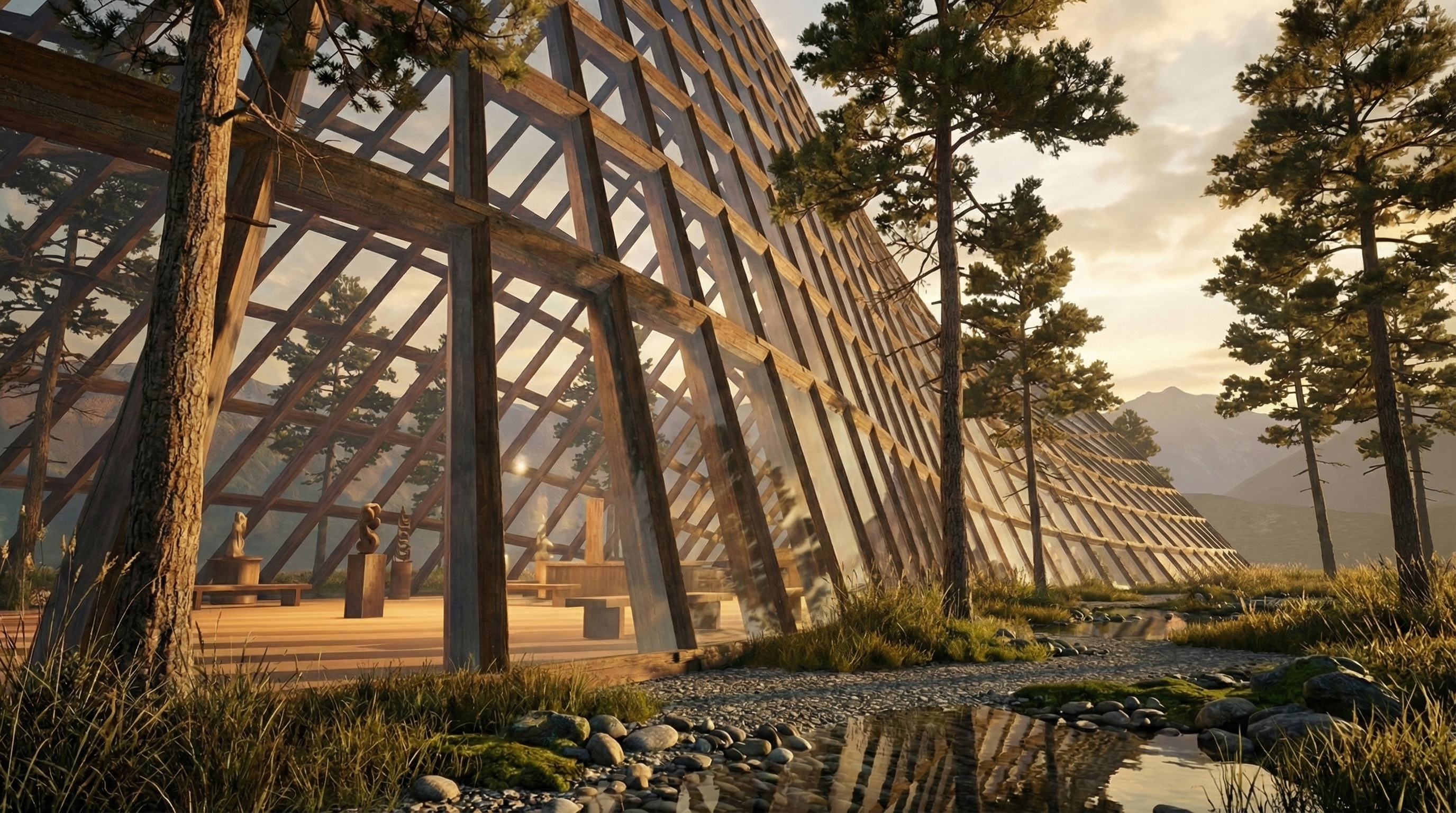
Ruled surfaces ensure that visual complexity does not translate into fabrication complexity. Every panel in Torre ZMX is planar. Every timber member in the Pabellón is straight. Every diagrid element in Hotel Diagrid Puerto Escondido is a standard section. The workflow produces architecture that looks computationally sophisticated and builds conventionally — the optimal combination for developers who want differentiation without construction risk.
The Business Outcome
For developers, this workflow means: 8-17% sale price premiums from facade differentiation, 25-35% OPEX reduction from bioclimatic envelope optimization, 23% faster absorption from distinctive architectural identity, and construction documents that are generated from the same model as the renders — no surprises between what was sold and what gets built.
Related: What Is Parametric Architecture? The Definitive Guide → | Parametric Facade Design Guide → | High-Performance Building Design →
FAQ
What software does Arquitectura Introspectiva use?
Our core stack is ARCHICAD for BIM documentation, Rhinoceros 3D + Grasshopper for parametric design, Ladybug and Honeybee for environmental analysis (solar radiation, thermal comfort, energy modeling), and Twinmotion for real-time visualization. We also integrate AI tools for early-stage concept development. The Rhino-ARCHICAD Live Connection is the critical bridge that enables geometry to flow bidirectionally between parametric design and BIM documentation without export/import steps.
Why ARCHICAD instead of Revit?
David Serrano spent 8 years at GRAPHISOFT, the company that develops ARCHICAD. Beyond that personal expertise, the technical reason is the Rhino-ARCHICAD Live Connection: it enables a true bidirectional round-trip between parametric modeling in Grasshopper and BIM documentation in ARCHICAD. Geometry streams into ARCHICAD as native BIM elements with full property data and scheduling — no export/import cycle, no geometry degradation. This parametric-to-BIM pipeline is more seamless than the equivalent Revit + Dynamo workflow for our type of ruled surface and complex envelope projects.
How does Ladybug integrate with parametric design?
Ladybug and Honeybee run as plugins directly inside Grasshopper, which means environmental analysis happens on the actual parametric geometry in real time. When we adjust a panel angle in the Grasshopper definition, the Ladybug radiation map updates immediately. Solar radiation values (kWh/m²) feed directly into the parametric logic as input parameters — high radiation zones drive steeper shading angles, view corridors drive larger apertures. The analysis is not a separate step; it is wired into the same definition that generates the geometry.
Can parametric designs be documented for construction?
Yes. Through the Rhino-ARCHICAD Live Connection, parametric geometry from Grasshopper flows into ARCHICAD as native BIM elements — walls, slabs, curtain wall panels — with full property data, classification codes, and material assignments. ARCHICAD then generates complete construction documentation: plans, sections, elevations, details, panel schedules, material quantities, and IFC exports for coordination with structural engineers and contractors. The documentation model and the parametric model are the same data.
How does AI fit into parametric architecture?
We use AI for the earliest and most strategic phase: analyzing project briefs, generating design concepts, and exploring programmatic options before parametric modeling begins. AI compresses the strategic phase from weeks to hours. It does not replace the parametric workflow — it accelerates the input to it. Grasshopper definitions, Ladybug analyses, ARCHICAD documentation, and professional design judgment remain entirely architect-driven.
How long does your typical design process take?
A parametric feasibility study takes 2-4 weeks and includes environmental analysis, massing options, and facade concept directions. Full schematic design runs 4-6 weeks with Ladybug analysis running in parallel. Design development and documentation take 8-12 weeks, producing construction-ready documents from the parametric BIM model. The total schematic-through-DD timeline is typically 3-5 months — comparable to or shorter than conventional design despite producing a more optimized result, because parametric algorithms generate and evaluate variations in minutes rather than days.